 PigWars
Skin Studio
Making a skin, step by step.
How a skin is stored, why the flat picture looks broken, and what to do so your design survives being worn by a small pig.
The studio hides all of this; you can make a good skin without ever reading this page. But a few facts about how a skin is stored explain why the pictures behave the way they do, and they save you from the three or four things that go wrong most often.
A skin is a single square image, 512 or 1024 pixels on a side, saved as a PNG. The garment is wrapped in it, the way a sewing pattern becomes a shirt. That is all the game needs from you: one file per garment.
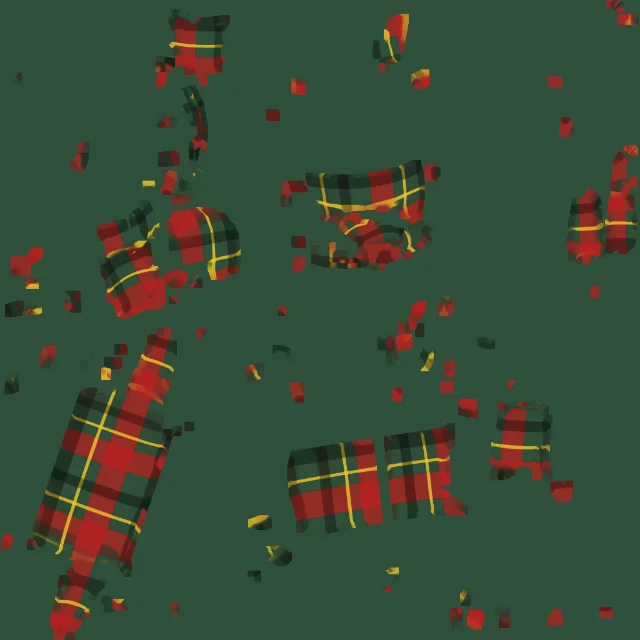
If you download the PNG you will see the pieces of the garment laid out flat and scattered: a sleeve here, half a back there. This is called an unwrapping, or a UV layout. It looks wrong because it is a pattern, not a picture. The studio draws your colour, texture and images onto those pieces for you, from the angle you chose, so you never have to paint on the pieces yourself.
The pieces only fill a small part of the square, roughly a tenth to a fifth depending on the garment. The rest is empty, and the studio fills it with the base colour so the edges of the pieces blend cleanly when the game shows them from an angle.
Because the pieces use a small part of the square, the pixels are spread thin. An image 30 cm wide on the pig ends up about 60 pixels wide in a 512 texture and about 120 pixels in a 1024 one. That is why the studio defaults to 1024. There is no reason to go lower unless you want a smaller file.
Your own source pictures can be bigger. The studio accepts anything the browser can open (PNG, JPEG, WebP, a still from a GIF) and shrinks it to at most 1024 pixels on its longest side when you load it.
The studio produces exactly this, so you only need to know it if you make the PNG some other way.
Where two pieces of a garment meet, particularly on skirts and coats, you can see a faint streak of colour. It is a limit of how the pieces are stored, not something you did. Keep important images away from the edges of a skirt, and the streak will not matter.
Making a skin, step by step.
What each one covers and how to design for it.
Thirty outfits to steal, with recipes.
The Skin Studio is free and runs in your browser. No account needed to try it.